Myspace added a new class today to prevent large comments from stretching your page. The new code forces max-width to 100% and then, using javascript, it sets the width of the image to 400, but only if the image is wider than 400px. If the image is not larger than 400, then it sets the width to "true" - not really sure i understand why, I would think that they would want to set it to AUTO instead of TRUE but what do I know...? lolz
Myspace also added a feature to enable/disable this functionality - You can find it under Account Settings >> Miscellaneous
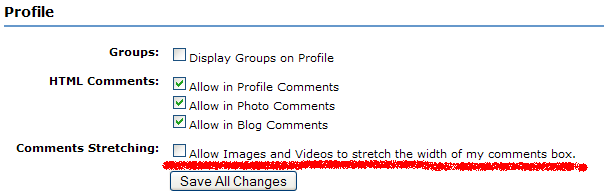
If you have the new feature enabled, you can use this new code to control the images sizing, but it will make all images in your comments the same size.
<style>

.a {resize comments images and videos}

table.friendsComments td.text td.columnsWidening embed, table.friendsComments td.text td.columnsWidening object {width:254px!important; height:213px!important;}

table.friendsComments td.text td.columnsWidening img {width:300px!important;}

</style>
If you have the new feature DISABLED (enabled is the default setting) then you can go back to using the old code for resizing image comments:
<style>

.a {resize comments images and videos}

.a {must disable myspace code to use this}

table.friendsComments td.text td.columnsWidening embed, table.friendsComments td.text td.columnsWidening object {width:260px!important; height:213px!important;}

table.friendsComments td.text td.columnsWidening img {max-width:260px!important; _width:260px!important;}


</style>


